


Uncategorized
How to Respond to a Black Hat Intrusion: 9 Steps
Sep
How to Respond to a Black Hat Intrusion: 9 Steps
A 9-step incident-response checklist that settles what to do first after a black hat intrusion — incident declaration (hat types and legality), trusted communications, volatile-first evidence capture (and when to bring in DFIR), fast scoping and quiet containment, and eradication plus closeout decision forks so the response doesn’t destroy proof or amplify damage.
You’ve spotted signs that someone is inside your systems who shouldn’t be. In the first hour, the wrong “cleanup” move can erase what you’ll need to prove what happened, alert the intruder that you’ve noticed, or push you into unplanned downtime. If customer data may be involved, delays and sloppy notes can also turn into missed notification obligations.
This checklist gives you a nine-step sequence: declare an incident (including hat types and legality), switch to trusted communications, capture volatile-first evidence and decide when to bring in DFIR, scope impact fast, contain quietly, then eradicate, recover, and close the incident with clear decision forks along the way.
Step 1: Declare incident
Treat this as a black hat hacker intrusion—an attacker accessing systems illegally and with malicious intent, not an authorized tester—until you can prove otherwise. Make an incident declaration (the internal decision that the event is serious enough to trigger your incident response process and authority structure) and open a single incident record immediately.
Assign one incident commander, name backups, and state what they can approve (account disables, host isolation, vendor engagement, legal/police contact). Start an actions log and an evidence log from minute one: who did what, on which system, when (with time zone), and where any collected artifacts are stored. NIST’s incident handling guidance is explicit that evidence handling and transfers should be documented with chain-of-custody forms and a detailed evidence log.
Stop uncoordinated “cleanup.” The #StopRansomware guidance warns malicious actors may monitor your activity and communications; tipping them off can trigger lateral movement or broader ransomware deployment before you’re ready.
Hat types, legality
- Black hat: illegal, malicious access. That’s the working assumption when you see unauthorized control, persistence, or data access you didn’t approve.
- Gray hat: unauthorized access without clear malicious intent; they may still break rules and expose you to the same evidence and notification requirements.
- Legality: unauthorized access is criminalized in U.S. law under the Computer Fraud and Abuse Act (18 U.S. Code § 1030).
- “Famous hacker” name lists: there’s no single definitive “most famous” black hat hacker, and chasing celebrity names won’t tell you what to do next.
- What helps instead: one commander, one record, one log—so every action is authorized, repeatable, and defensible.
Step 2: Trusted comms
Move coordination off potentially monitored systems fast. Use out-of-band communication—coordination channels not reliant on potentially compromised corporate systems (for example, phone calls instead of email/Slack)—and treat everything else as “unsafe until proven.”
- Pick the OOB channel and roster. Create a short contact list (primary + backup). Do call-backs so you’re not trusting an attacker-controlled message thread.
- Create a “clean” place to work. Use a hardened workstation (or a known-good device/account set) for monitoring and response coordination.
- Freeze unapproved change. Pause deployments, config management, and “helpful” admin work. Changes only happen with incident-commander approval and get recorded.
- Clamp down on broadcasting. Don’t notify compromised users by email, and don’t upload suspicious files to public analysis services (for example, VirusTotal) while the intrusion is active.
You’re not being paranoid—you’re denying the attacker your play-by-play.
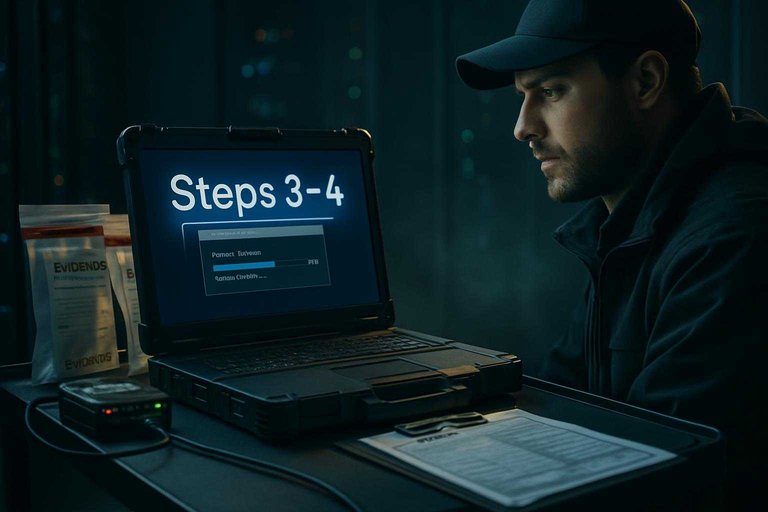
Steps 3–4: Capture evidence
Your next job is to preserve what disappears first and to stop log sources from overwriting the story.
Start with volatile data—information that can vanish on reboot or power-off (for example, RAM contents and some in-memory buffers). Treat everything you collect like it may need chain of custody—documented control of evidence handling (who had it, when, where, and what they did) to preserve integrity for audits or court.
Volatile first
- Freeze power state and reboots. If you must cut attacker access before you finish collection, isolate the host by unplugging the network/removing it from Wi‑Fi rather than powering down; the #StopRansomware Guide recommends powering down only when a device can’t be disconnected, because power-off prevents maintaining artifacts and potential evidence stored in volatile memory.
- Capture RAM and other live artifacts first (if you can do it safely). Live collection changes the system; record exactly what tooling/actions you took so later analysis can separate attacker activity from responder activity.
- Lock time down. Record the system time and time zone for each capture, and check that host clocks are synchronized via NTP (Network Time Protocol) so timestamps can be correlated later.
- Preserve “rolling” logs before they roll. Export copies from the sources you’ll need for timeline and scope—Windows event logs and firewall logs are common starting points—then take disk images or snapshots for deeper review.
Bring in DFIR
If you don’t have in-house forensics muscle, bring in a third-party incident response / DFIR team early. Digital forensics is the discipline of identifying, collecting, examining, and analyzing data while preserving integrity and maintaining strict chain of custody—and doing that under pressure is a specialty.
A team such as Hacknexa.io (listed as offering digital forensics) can run the evidence capture so you don’t destroy what you’ll later need to prove scope, support notifications, or share defensible artifacts like RAM captures and key logs with law enforcement where appropriate. If you already have a retained IR/DFIR provider or a proven internal forensics function, use that instead.
Steps 5–6: Scope fast
- Build one time-aligned timeline across systems. Start with event correlation—linking multiple log sources to reconstruct what happened (because each log usually shows only part of the story). Verify time zones and clock sync first; NIST notes that inconsistent timestamps make event correlation harder and can create evidentiary problems.
Pull the minimum set you need to tell the story end-to-end:
- Identity/auth logs (SSO, MFA, admin actions)
- VPN/remote access and firewall/proxy logs
- Endpoint telemetry from your EDR (Endpoint Detection and Response)
- Centralized queries in your SIEM (Security Information and Event Management)
Don’t stop at “today.” NIST recommends a log retention policy because incidents may surface weeks or months later, and older logs may show earlier reconnaissance or similar activity.
- Convert the timeline into scope: who/what/where next. As you review, extract every IOC (Indicator of Compromise)—a specific artifact (hash, domain, IP, log pattern, account activity) that suggests malicious activity occurred—and pivot across systems.
Write down, in this order:
- Impacted identities: users, service accounts, admins; first-seen misuse time
- Impacted systems: endpoints/servers/cloud resources touched, in time order
- Access path: initial entry point → privilege changes → lateral movement
- Persistence: new accounts, scheduled tasks, startup items, remote tooling
- Exfiltration targets: file shares, databases, mailboxes, cloud storage
That scoped list becomes the input to your containment sequence—without guessing or “cleaning” blind.
Step 7: Contain quietly
Containment—actions that stop attacker activity and prevent spread while you investigate—is where you win or lose the next hour. The #StopRansomware guidance warns that if you tip them off, you can trigger rapid lateral movement or wider ransomware deployment before you’re ready.
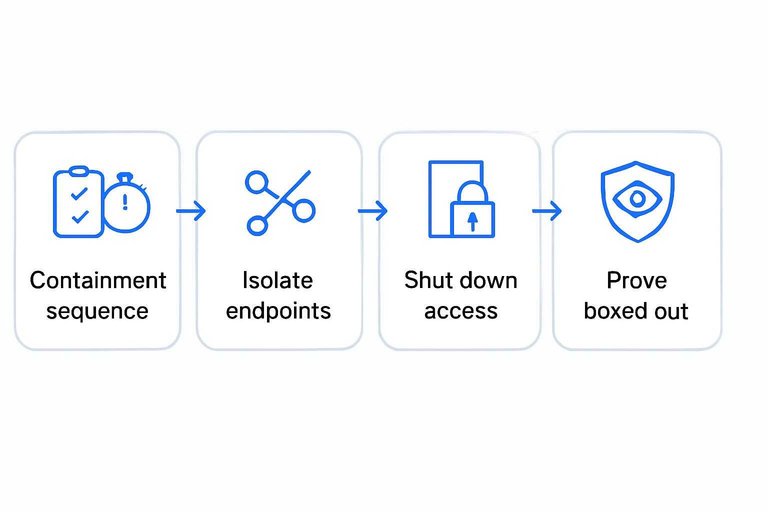
- Run a containment sequence, not a scramble. Pick the first systems and accounts to isolate based on your scoped access path, and execute in a tight window so the attacker can’t pivot between moves.
- Isolate endpoints without destroying volatile evidence. If you can’t take the whole network offline, disconnect affected devices from the network / remove them from Wi‑Fi; power down only if you can’t disconnect, because shutdown can wipe artifacts in memory.
- Shut down access paths. Disable known-compromised accounts, cut off remote entry points you see in the timeline (VPN/RDP/admin portals), and block the attacker’s infrastructure (IOCs) at the edge.
- Remove persistence—or rebuild when you can’t trust the host. Delete unauthorized accounts/tasks/remote tools; if compromise depth is uncertain, favor reimage/restore from a known-good source over “cleaning.”
- Prove they’re boxed out. Watch for renewed logins, privilege changes, or new beacons; if they reappear, repeat the sequence with the next tier of systems.
Three decision forks
Make these calls once, in the incident record, before you take the next containment move. Teams lose time (and OPSEC) when they re‑litigate them on every host.
- Isolate or power down? Default to coordinated isolation (unplug network/remove Wi‑Fi). Powering off is a last resort when you can’t disconnect, because it can wipe volatile memory evidence you may still need to finish boxing the attacker out.
- Go public with samples or stay private? During an active intrusion, don’t upload suspicious files to public analysis services (for example, VirusTotal) and don’t “warn everyone” on corporate email. Use hardened/OOB workflows and controlled sharing with trusted partners.
- When are you “contained enough” to start rebuilding? Write down the gate criteria using the same phases your team will execute under stress. NIST SP 800-61 defines four major phases—Preparation; Detection and Analysis; Containment, Eradication and Recovery; and Post-Incident Activity—so put your “rebuild starts when…” rules under Containment, Eradication and Recovery to avoid turning recovery work into a reinfection path.
Document for each fork: decision, time, owner, systems in scope, and why. Then execute the sequence without improvising mid-stream.
Steps 8–9: Eradicate & close
You’re done “boxing them out.” Now you make it hard for the same black hat hacker to come back—and you finish the paperwork that will be judged later.
- Eradicate (remove footholds + persistence) and restore from known-good sources.
- Eradication means removing attacker footholds and persistence mechanisms so they can’t return via the same compromise.
- Prefer rebuild/restore over “cleaning” when you can’t prove the host is trustworthy.
- Remove what gives them a path back: unauthorized accounts, scheduled tasks/startup items, remote tooling, and any backdoored configs you identified during scoping.
- Reset/rotate credentials and keys tied to impacted identities and systems, then bring services back from a known-good baseline (gold images, clean repos, validated backups).
- Validate before reopening: confirm expected access paths only, and watch for re-appearance of the same indicators.
- Close the loop: notify, report, and lock in control changes.
- Report to the right responders: the #StopRansomware guidance recommends reporting incidents to CISA, the FBI, IC3, or a local U.S. Secret Service field office, and sharing artifacts (where legally permitted) like logs and system images.
- Hit regulatory clocks that apply to you:
- GDPR: notify the supervisory authority within 72 hours where feasible.
- SEC: a Form 8‑K Item 1.05 is generally due four business days after you determine the incident is materiality—the legal threshold for whether SEC disclosure is required.
- HIPAA: notify affected individuals no later than 60 days after discovery.
- FTC GLBA Safeguards Rule: notify the FTC no later than 30 days after discovery if at least 500 consumers are affected (notification requirement now in effect).
- Publish a post-incident report and change log (owners + due dates). NIST frames this as “post-incident activity” after containment/eradication/recovery.
Act in the right order
When you have credible signs of a black hat intrusion, the fastest way to make it worse is to start “fixing” things before you’ve declared the incident, moved to trusted communications, and preserved volatile-first evidence with a real actions/evidence log. Scope from time-aligned data, then contain in a quiet, coordinated sequence that cuts access paths without tipping the attacker off—and only then shift into eradication and recovery from known-good sources. If you don’t have the in-house forensics depth to capture defensible artifacts under pressure, pull in a DFIR team early; if you do, activate your retained/internal capability and keep every decision fork written down in the incident record. Finish by meeting notification/reporting clocks and locking the lessons into control changes, so this entry path doesn’t work twice.
Prove What Happened, Fast
After the first-hour actions, the pressure shifts to building a defensible story across endpoints, cloud, and identity—without losing artifacts or reworking decisions later.
Hacknexa.io offers digital forensics and incident response support alongside penetration testing and vulnerability assessment to help you validate intrusion paths, preserve evidence, and close the gaps a black hat hacker used.
Sources
- 18 U.S. Code § 1030 — Fraud and related activity in connection with computers (Cornell LII) — referenced in Hat types, legality
- #StopRansomware Guide (PDF) — referenced in Volatile first
- NIST SP 800-61 Rev. 2: Computer Security Incident Handling Guide (PDF) — referenced in Steps 5–6: Scope fast, Three decision forks
- Safeguards Rule notification requirement now in effect | Federal Trade Commission — referenced in Steps 8–9: Eradicate & close
